The Problem with Buying Glasses Online
Every year, millions of people order glasses online and are disappointed when they arrive. The frame looked great on the model. On your face, it looks completely different.
The core issue is simple: a product photo shows how glasses look off your face. You need to see how they look on your face.
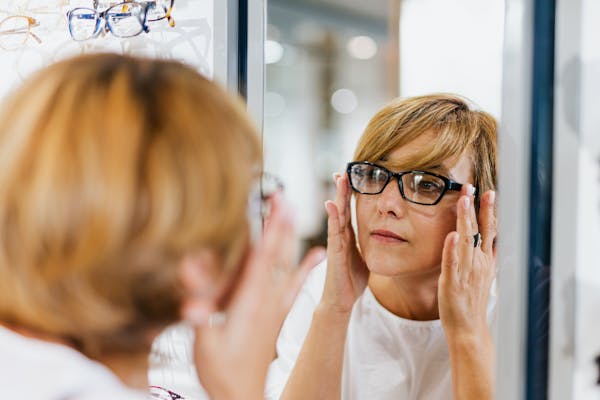
Traditional solutions — going to a store, trying on 30 pairs under fluorescent lighting, feeling rushed by sales staff — are inconvenient. And even in-store try-ons have limits: you are choosing from whatever is in stock, not from a catalog of thousands.
AI virtual try-on solves this by putting your face at the center of the experience.
How AI Glasses Virtual Try-On Actually Works
The technology behind virtual try-on is more sophisticated than most people realize. It is not just a filter — it is a pipeline of computer vision and AI working together.
Step 1: Face Landmark Detection
When you upload a photo or open your camera, the system runs facial landmark detection. This identifies 400+ key points on your face:
- Eye corners and pupil positions
- Nose bridge width and angle
- Jawline contour and chin shape
- Temple width (the distance between your ears)
- Cheekbone prominence
These measurements create a geometric map of your face — essentially a 3D wireframe built from a 2D image.
Tools like TryBestSpecs use MediaPipe for this step, which runs directly in your browser — your photo never leaves your device during the analysis phase.
Step 2: Face Shape Classification
The geometric measurements are fed into an AI classifier that determines your face shape:

Trying on glasses in-store vs AI virtual try-on
| Measurement Ratio | Likely Shape |
|---|---|
| Width ≈ Length, soft angles | Round |
| Width ≈ Length, strong jaw | Square |
| Length > Width ~1.3-1.5x | Oval |
| Forehead much wider than chin | Heart |
| Length > Width > 1.5x | Oblong |
| Wide cheekbones, narrow forehead/chin | Diamond |
The classifier does not just match to one shape — it can identify blends (e.g., "oval leaning toward heart") which gives more nuanced recommendations.
Step 3: Skin Tone and Undertone Analysis
Beyond face shape, AI analyzes your skin tone from the photo:
- Warm undertones → Gold, tortoise, warm brown, olive, amber frames
- Cool undertones → Silver, black, blue, purple, cool gray frames
- Neutral undertones → Most colors work; the widest range of options
This analysis happens automatically — no need to hold up a color chart or guess your undertone.
Step 4: Frame Recommendation and Rendering
With face shape and skin tone data, the AI:
- Filters a frame catalog to shapes that match your face geometry
- Further filters by colors that complement your skin tone
- Ranks frames by how well they balance your specific features
- Renders the top recommendations directly onto your photo
The rendering is not a simple overlay. A good AI try-on system adjusts:
- Scale — Frames are sized to match your actual eye and temple measurements
- Position — Aligned to your nose bridge, not just pasted over the eyes
- Angle — Matches the tilt of your head in the photo
- Lighting — Shadows and highlights on the frames match your ambient lighting
- Lens reflections — Subtle reflections that make the lenses look realistic
What Makes a Good Virtual Try-On (vs. a Bad One)
Not all virtual try-on tools are equal. Here is what separates a useful try-on from a gimmick:
✅ Good Virtual Try-On
- Frames are proportionally correct for your face
- Alignment follows your nose bridge and eye position
- Lighting and shadows match the original photo
- You can compare multiple frames side by side
- Results are saved so you can revisit and share
- Works on mobile without downloading an app
❌ Bad Virtual Try-On
- Frames are the wrong size or float above your face
- Flat overlay with no depth or shadow
- Only one frame at a time, no comparison
- Requires downloading an app or creating an account before seeing results
- Low-resolution rendering that looks obviously fake
TryBestSpecs is designed around the "good" criteria — accurate proportions, realistic lighting, and instant results without forcing an app download.
AI Try-On vs. In-Store Shopping: Honest Comparison
| Factor | AI Virtual Try-On | In-Store Shopping |
|---|---|---|
| Frame selection | Thousands of styles | Limited to store inventory |
| Time required | 30 seconds to try 10 frames | 30-60 minutes for 10 frames |
| Pressure | None — browse at your own pace | Sales staff influence |
| Accuracy | AI-measured face geometry | Visual guesswork in a mirror |
| Comparison | Side-by-side on your own photo | One at a time |
| Convenience | Any device, anywhere | Must visit store during business hours |
| Cost | Free or low cost | Travel time + impulse buying |
| Best for | Narrowing down choices, initial exploration | Final fit check, feeling material weight |
The ideal workflow: Use AI try-on to narrow your top 5-10 picks, then visit a store (if needed) to confirm the final choice.
Privacy Concerns: Is My Photo Safe?
This is the most common question, and it is valid. Here is what to look for:
What Good Tools Do
- Process face analysis in the browser (on-device) when possible
- Do not use your photos for AI training
- Do not sell or share your images with third parties
- Allow you to delete your account and all associated data
- Clearly explain their data handling in a privacy policy
Red Flags
- No privacy policy, or a vague one
- Requires access to your entire photo library
- No option to delete your data
- Uses your photos in marketing without permission
TryBestSpecs processes face analysis client-side (in your browser) and states in its Privacy Policy that photos are not used for training or shared with third parties.
Who Benefits Most from AI Virtual Try-On?
Online Glasses Shoppers
The most obvious use case. If you are buying glasses from any online retailer, use AI try-on first to see how different shapes look on your face before ordering.
People Who Hate Store Shopping
If you find in-store glasses shopping overwhelming or awkward, AI try-on lets you explore in private, at your own pace, without anyone hovering.
Glasses Enthusiasts
If you like to have multiple pairs for different occasions, AI try-on makes it easy to experiment with styles you would not normally consider.
Gift Buyers
Buying glasses for someone else? With their photo (and permission), you can find frames that suit their face shape.
People with Prescription Needs
While AI try-on does not replace an eye exam, it helps you pick frames that fit your face before you even step into an optometrist's office. Bring your top picks to your next appointment.
How to Get the Best Virtual Try-On Results
The quality of your try-on depends on the quality of your input photo:
Photo Tips for Best Results
- Front-facing — Look directly at the camera, not to the side
- Good lighting — Natural light is best; avoid harsh shadows on your face
- No existing glasses — Remove sunglasses or prescription glasses
- Clean background — A plain wall works better than a busy background
- Hair away from face — If you have bangs, pin them back so the forehead and temples are visible
- Neutral expression — A relaxed face gives the AI the clearest geometry
- Both eyes visible — Avoid hair or hands covering one eye
Camera Tips (Live Mode)
- Hold the phone at eye level
- Ensure your face is well-lit from the front
- Keep a steady hand or prop the phone up
- Take the photo when the on-screen guide shows a good face position
The Technology Behind TryBestSpecs
TryBestSpecs combines several AI technologies:
- MediaPipe Face Mesh — Runs in the browser to detect 468 facial landmarks with sub-pixel accuracy
- AI — Classifies face shape and skin tone from the landmark data
- AI Rendering Engine — Places recommended frames on your face with proper scale, angle, and lighting
- Next.js Web App — No app download required; works on any modern browser, desktop or mobile
The entire process — from photo upload to realistic try-on — takes under 30 seconds.
Try It Now
Ready to see how different glasses look on your face? No app, no download, no commitment.
- Go to TryBestSpecs.com
- Upload a photo or open your camera
- See AI-recommended frames rendered on your face
- Save, compare, and share your favorites
→ Start Your Free Virtual Try-On
Frequently Asked Questions
Does AI try-on work on phones?
Yes. TryBestSpecs works in any modern mobile browser — Chrome, Safari, Firefox. You can upload from your gallery or use your phone's camera directly.
Is it really free?
Basic virtual try-on is free after signup. Premium features like extended try-on history and exclusive frame styles are available on paid plans.
How accurate is the face shape analysis?
AI face shape classification uses 400+ facial measurements, making it more consistent than visual self-assessment. It is a strong starting point for frame selection, though personal style preferences always play a role.
Can I use it for sunglasses too?
Yes. AI try-on works for both prescription eyeglasses and sunglasses. The same face shape and skin tone analysis applies.
Do I need to create an account?
You can see the technology in action on the homepage. To save your try-on results and access the full frame catalog, a free account is needed.
Last updated: May 2026 Author: TryBestSpecs Team